This is what a Digital Business Card with QR Code looks like!
A digital business card with a QR code is an online contact profile that opens when you scan the QR with a phone camera, showing your details, links and a button to save you to contacts. It needs no app and updates in real time. Sales teams use it to share their contact and capture leads with no paper.
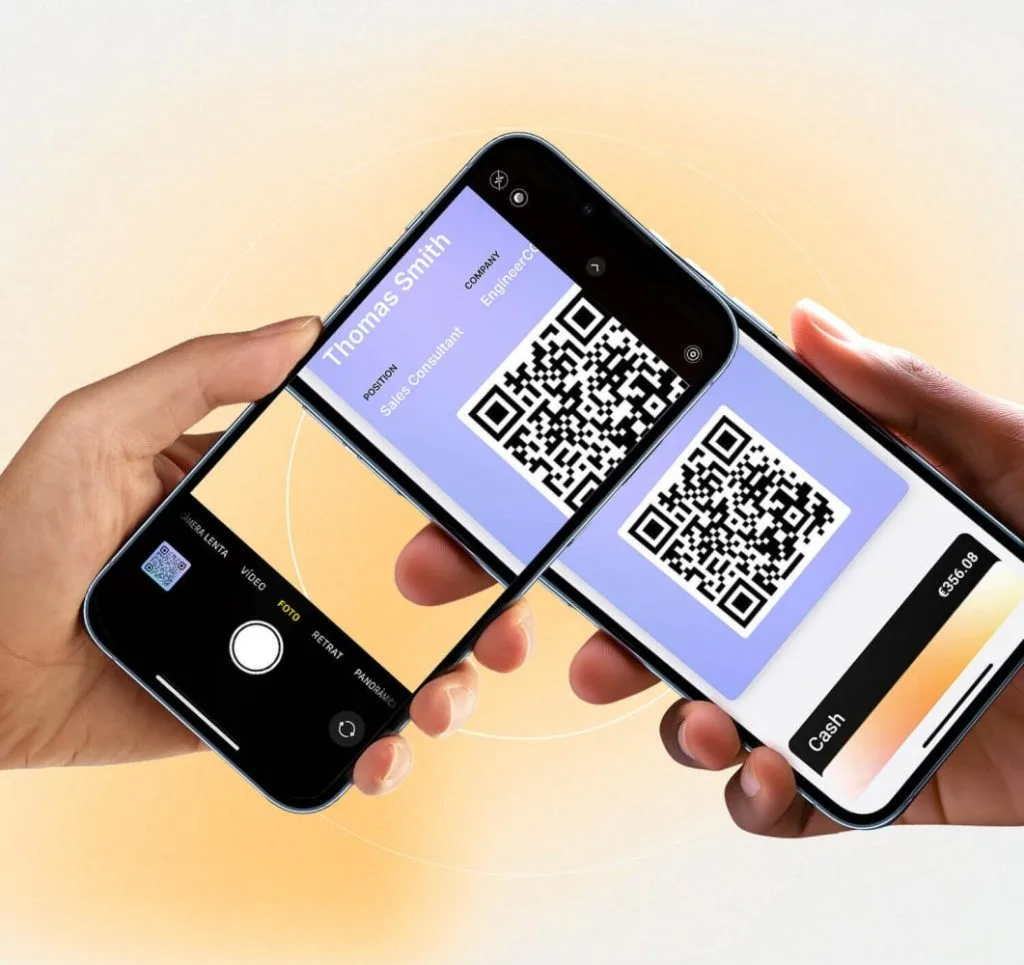
You may be wondering what a (digital business) card managed with a QR code actually is. If so, this article is for you. Read on and discover how you could use it, what it means, and the basic steps to create your own, make your information easy to access and get yourself known in the professional world in a few simple steps.
Defining the Digital Business Card with QR code
A digital business card with QR serves many purposes, above all in the workplace and when promoting a service that only you can offer. They do the job of a classic business card, but in a far more precise, easy-to-obtain, affordable and editable way.
How do we get our card to do everything mentioned above? Thanks to the QR code! That small square off to one side, full of various symbols, can be read by any scanner or smart camera and is able to transfer data in just a couple of seconds.
What is a digital business card?
We are talking about a business card that will soon be shared across the online community and electronic media, in order to get you known in a more professional setting or to reach a wider audience.
Essentially, it does the same job as a classic business card, but in this case it will be shared through digital channels, with the added benefit of being able to edit it whenever you want.
Benefits of adding the QR code to digital cards
You may not yet have grasped the difference a QR code makes on your business card. Keep in mind that adding this square to your card could give it:
- Better reach: By being able to transmit this tool's information through the code, you can get many more people to know you, scan it and read your presentation with no limits of space or location.
- Easy to use: Adding this code is very simple; you won't have to do any programming or go through any complicated process. What's more, you will sometimes even find ready-made QR codes.
- More dynamic and professional: Using this method keeps you, your brand and your potential clients up to date. Your information will look far more professional and polished without having to invest much money.
Key features of a Digital Business Card with QR
All right, we are now stepping into the digital world. There are certain things you will come across as you start using these business cards, so it's worth explaining their main features in detail. Here we go!
Ease of use and accessibility
Business cards give you a fresh, up-to-date image with no fees or high costs; on top of that, they aren't very hard to create. There are preset designs that make the job much easier or, if you prefer, you can add your personal touch by designing exactly what you like best.
Real-time updates
This point is one of the best, because you can create your presentation and, no matter how much time goes by, you can always correct, update or change any detail, and this won't affect the view for any user; that is, these changes are reflected in real time whenever you want.
Personalization and branding
Even though you can find designs that are practically ready to go, the most enjoyable part of the process is that you can edit your digital business card with QR exactly as you need, including the color, the layout and the content. This helps keep your brand fresh and respect the patterns that identify it.
Integration with other tools and platforms
To make this system far more interactive, the QR code on your digital business card can link the information with other platforms across the web, as well as with CRM (Customer Relationship Manager) tools or in the sharing of contacts. This makes it easier for your card to connect with a large number of apps.
Lead2Team - Leading Innovation in Digital Cards
So, if these points are what you're looking for in a digital business card that is quick to set up and fast to create, then give Lead2Team a try, a site that lets you create an account in just a few steps and add your details through the web from wherever you are.
Why is Lead2Team the preferred choice for digital cards with QR?
It is a highly effective platform that, from the very first moment, inspires confidence thanks to an interface that's very easy to understand, perfect for those who are getting started in the world of networks and decide to boost their brand's performance.
What's more, Lead2Team is one of the few options that lets you connect with a wide variety of different apps in less than a minute.
Testimonials from satisfied Lead2Team users
On the Lead2Team website or on review pages such as Trustpilot you can find testimonials from real customers, who give it a practically perfect rating for the quality of service Lead2Team provides; they all agree that using this software has been an excellent decision, but it's better that you read it for yourself. Here are a few testimonials:
- Automotive brands such as Jaguar Land Rover and Ford.
- Fluidea, a grants consultancy
- La Santa Pari , an events and weddings company
- Grupo LG Barcelona
How to create and use your own Digital Business Card with QR?
You'll be surprised how easy it is to generate your own Digital Business Card and put it to use in the market. You won't need to make any payments for this to be possible; in 5 simple steps your business or personal brand can become far more recognizable.
Simple steps to design your digital card
- Create a Lead2Team account: Just like on any other social network or app, you will need an email, a password and some verification method, among other details.
- Go to the menu in the agents area and fill in the form: Enter everything your business card should include, along with a photo or logo.
- Add connectors: You will have a list of connectors to redirect or manage your contacts, for example WhatsApp.
- Create your design: Click the settings option and go to the design; here select the template you want or customize the details.
- Generate the link or the QR: Almost everything is ready now; you can generate a QR code that leads to it or a reference link you can share with your new contacts.
- Start sharing: You've created your digital business card with QR! Now you can start putting it to use across the web.
How to scan and share your card with QR
You'll need to use scanner tools or smart cameras to read the code you created; this is already part of the built-in options on your potential clients' devices.
Lead2Team lets you generate QR signatures at the end of any email, so that the recipient can access your essential information in any case. Even so, you can also share them to any available social network or platform, so that anyone with access can repeat this process.
Tips to maximize the impact of your digital card
- Add the information you need, no more, no less. Try to write down everything that matters: name, service or role, what you offer and why it's worth working with you. It should be short, to the point and engaging.
- A photo that identifies you as a professional changes your visual identity. Don't forget to add the photo that introduces you to other users; it should be clean and minimalist.
- Generate the QR code to simplify connecting. Don't skip this step, because a QR code makes access easier for anyone and in any situation you're in, so save this digital square on your phone or in your gallery.
- Review the design and the information included before sharing. Before you start sharing, keep an eye on the content you entered. Check that everything is correct; if it isn't, you'll always have time to edit it.
Conclusion: The Future of Personal and Professional Connections
Digital Business Cards with a QR code are new ways to reach many more people; this would speed up your brand and make it look far more professional than it already is, as well as keeping you up to date and integrated into the digital space.
Now that you know how to use it, you can choose web tools such as Lead2Team to create them easily and quickly, at very low costs depending on the design you build, bearing in mind that it will sync your contacts and improve the experience.
So, have you already created your own digital business card?
Related articles
Put it into practice with your team
Create your team's digital cards and share them in seconds, with full brand control.